

Ready to upgrade your virtual skies? Discover the top precision flight simulator yokes for every budget to build a highly realistic home cockpit and fly like a seasoned pro.
Why Your Keyboard Is Grounding Your Flight Sim Experience
Here is a hard truth that every aviation enthusiast discovers eventually: a keyboard and a gaming controller cannot replicate the physics of flight. Piloting an aircraft demands simultaneous, continuous, granular inputs across three axes—pitch, roll, and yaw—and binary keystrokes or abbreviated console thumbsticks simply cannot deliver that. The result is a simulation that feels more like a video game than a cockpit.
A dedicated flight simulator yoke changes everything. It introduces the tactile biomechanical feedback and spatial ergonomics that create a direct, visceral correlation between your physical input and your virtual aircraft’s aerodynamic response. For student pilots, this matters beyond immersion: practicing takeoff rotation, crosswind landing flares, and steep turns on a realistic yoke builds the kind of muscle memory that transfers directly to the physical flight deck of a real Cessna or Piper.
The intimidation factor, however, is real. The hardware options are vast, the calibration process can feel arcane, and the mounting requirements of some units are genuinely demanding. This guide cuts through all of it. Whether you are a casual weekend enthusiast or a serious student working toward instrument flight rules (IFR) proficiency, you will find the right yoke for your budget—and the precise steps to get it flying.
Essential Criteria: What to Look for in a Flight Simulator Yoke
Sensor Technology: The Single Most Important Spec
The way a yoke translates physical movement into digital data is the defining metric of its quality. The two dominant technologies are potentiometers and Hall-effect sensors, and the difference between them is not subtle.
Potentiometers are the traditional choice. They work by scraping a metallic wiper arm across a carbon resistive track to generate an analog voltage signal. They are cheap to manufacture—but that physical contact is their fatal flaw. Friction wears down the carbon track over time, generating electrical noise that manifests in the simulator as “jitter” or “spiking”: control surfaces that flutter erratically while your yoke sits perfectly still.
Hall-effect sensors eliminate this problem entirely. They use a semiconductor chip to measure changes in a magnetic field generated by a rare-earth magnet attached to the yoke shaft. Because there is zero physical contact between the sensor and the magnet, there is zero wear. These sensors are a genuine “fit and forget” solution that maintains factory-level accuracy across millions of actuation cycles.
One additional caveat: sensor quality alone does not determine precision. The resolution of the Digital-to-Analog Converter (DAC) also matters. A basic 8-bit DAC delivers only 256 measurement points across an axis. Premium aviation yokes pair their magnetic sensors with 12-bit or 16-bit converters, yielding 4,096 or 65,536 discrete steps respectively—granularity fine enough to register movements of a fraction of a millimeter and to execute flawless micro-corrections during a crosswind landing.
Mechanical Geometry: Degrees of Rotation and Pitch Travel
In a real Cessna 172, the yoke provides a full 180 degrees of roll rotation—90 degrees to the left and 90 to the right. Budget yokes frequently compress this to just 90 degrees total, forcing the simulator software to artificially amplify your inputs. A small hand correction becomes a violent deflection, and delicate operations like landing flares become dangerously difficult.
The pitch mechanism also varies by aircraft type. General aviation yokes use a linear shaft that slides forward and backward on internal bearings. Airliner-style yokes—like those found in Boeing heavy iron—use a pendular mechanism that pivots from a fulcrum near the floor, creating a sweeping arc of travel. Matching the geometry of your yoke to the aircraft you intend to fly is a straightforward upgrade to realism that costs nothing extra.
Platform Compatibility: PC vs. Xbox
Verify your platform before purchasing. PC simulators—Microsoft Flight Simulator (MSFS) 2024, X-Plane 12, Digital Combat Simulator (DCS)—operate on an open architecture that accepts virtually any USB-based flight peripheral via standard DirectInput and XInput protocols.
The Xbox ecosystem is an entirely closed loop. Microsoft requires manufacturers to embed proprietary encrypted security chips in any peripheral designed to interface with the console. A PC-only yoke will not function on an Xbox under any circumstances—no adapter will change that. Look for explicit “Made for Xbox” certification on the packaging.
Budget Tiers: How to Allocate Your Investment
The hardware market spans entry-level integrated systems to professional force-feedback rigs with motorized servos. Rather than fixating on a single price point, approach your cockpit as a modular build. Flight school professionals consistently recommend the same sequencing: allocate the largest share of your budget to the yoke first, then invest in secondary systems—rudder pedals, throttle quadrants, radio panels—as your proficiency and commitment grow.
The Best Entry-Level Yokes for Budget Builders
Logitech G Flight Yoke System
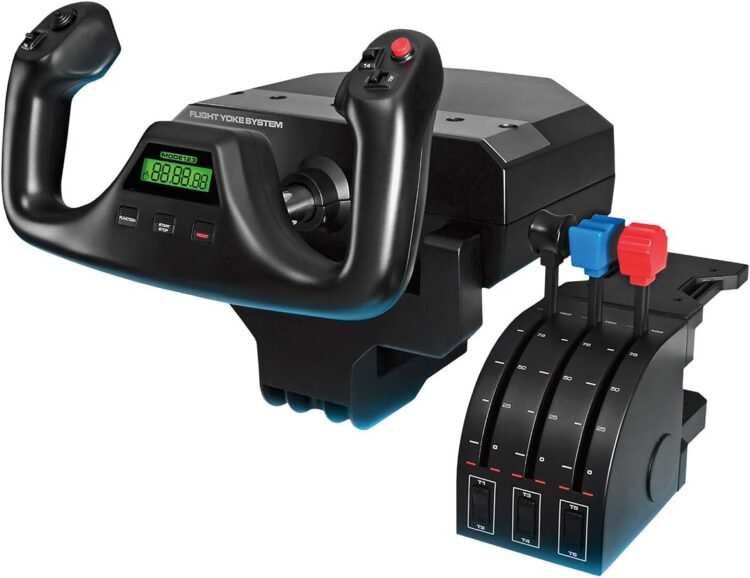
Originally developed by Saitek before Logitech acquired the brand, this system has been the baseline entry point for home flight simulation for over a decade—and its longevity reveals both its genuine strengths and its well-documented limitations.
Overview: The Logitech G features a stainless-steel yoke shaft in a plastic chassis and ships as a bundle that includes a separate three-lever throttle quadrant—an exceptional value proposition right out of the box. A built-in LCD chronometer on the yoke hub is useful for timing instrument holding patterns. Compatibility is essentially universal; virtually every simulator on the market includes a native plug-and-play profile for this unit.
Pros and Cons: The all-inclusive nature and broad software compatibility are genuine advantages. The engineering drawbacks, however, are significant. Roll rotation is limited to 90 degrees total, compressing inputs and complicating precise aileron corrections. The pitch axis is governed by a heavy centering spring that creates a pronounced center detent: you must apply disproportionate force to break the yoke from neutral, often resulting in a jerky pop that ruins delicate landing flares. Internally, carbon-track potentiometers make long-term drift and spiking essentially inevitable.
Best Use Case: The casual weekend flier who needs a complete, bundled control setup with minimal financial risk. It performs adequately for highly automated commercial airliner routes where manual hand-flying is limited to brief takeoff and approach phases.
Turtle Beach VelocityOne Flight Universal Control System
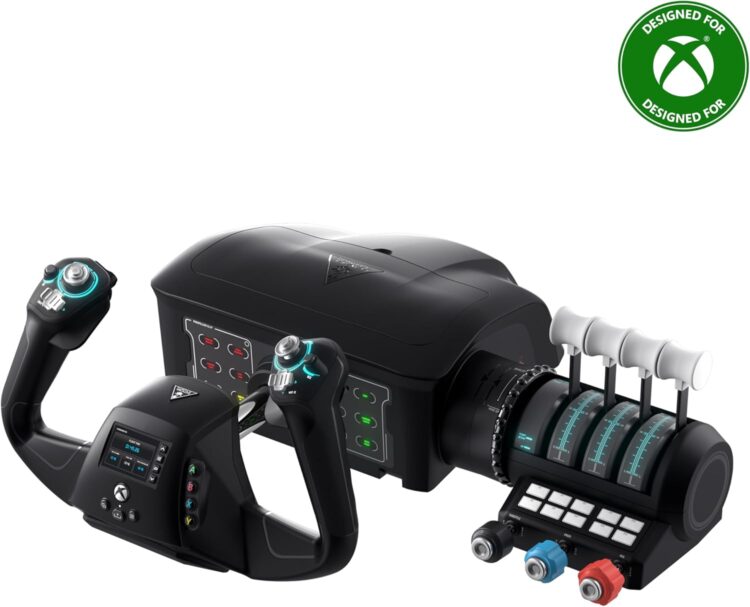
Turtle Beach engineered the VelocityOne as a genuinely modern entry-level product—designed from the ground up for both PC users and the Xbox ecosystem.
Overview: The VelocityOne is an integrated desktop workstation. Its hot-swappable throttle quadrant supports both push-pull vernier controls (ideal for simulating a Cessna 172 or Piper Cherokee) and standard lever controls (for twin-engine turboprops or jet operations). A full-color Flight Management Display (FMD) built into the yoke face allows real-time telemetry monitoring and profile switching without touching the keyboard.
Pros and Cons: The unit’s standout strength is its native “Made for Xbox” certification, delivering flawless plug-and-play console performance. Hall-effect sensors on both the pitch and roll axes provide smooth, drift-free accuracy that massively outclasses legacy potentiometer models. An integrated trim wheel on the throttle base is a meaningful addition for GA pilots managing aerodynamic control pressures. The key weakness is construction: the plastic yoke shaft is prone to friction-induced “stiction” as it slides through the housing. Micro-adjustments in pitch can feel corrugated and imprecise. Third-party aftermarket bearing kits address this, but the out-of-the-box pitch feel cannot match higher-tier hardware.
Best Use Case: The multi-platform user who splits simulation time between an Xbox in the living room and a PC at a desk, and wants maximum versatility from a single cohesive device.
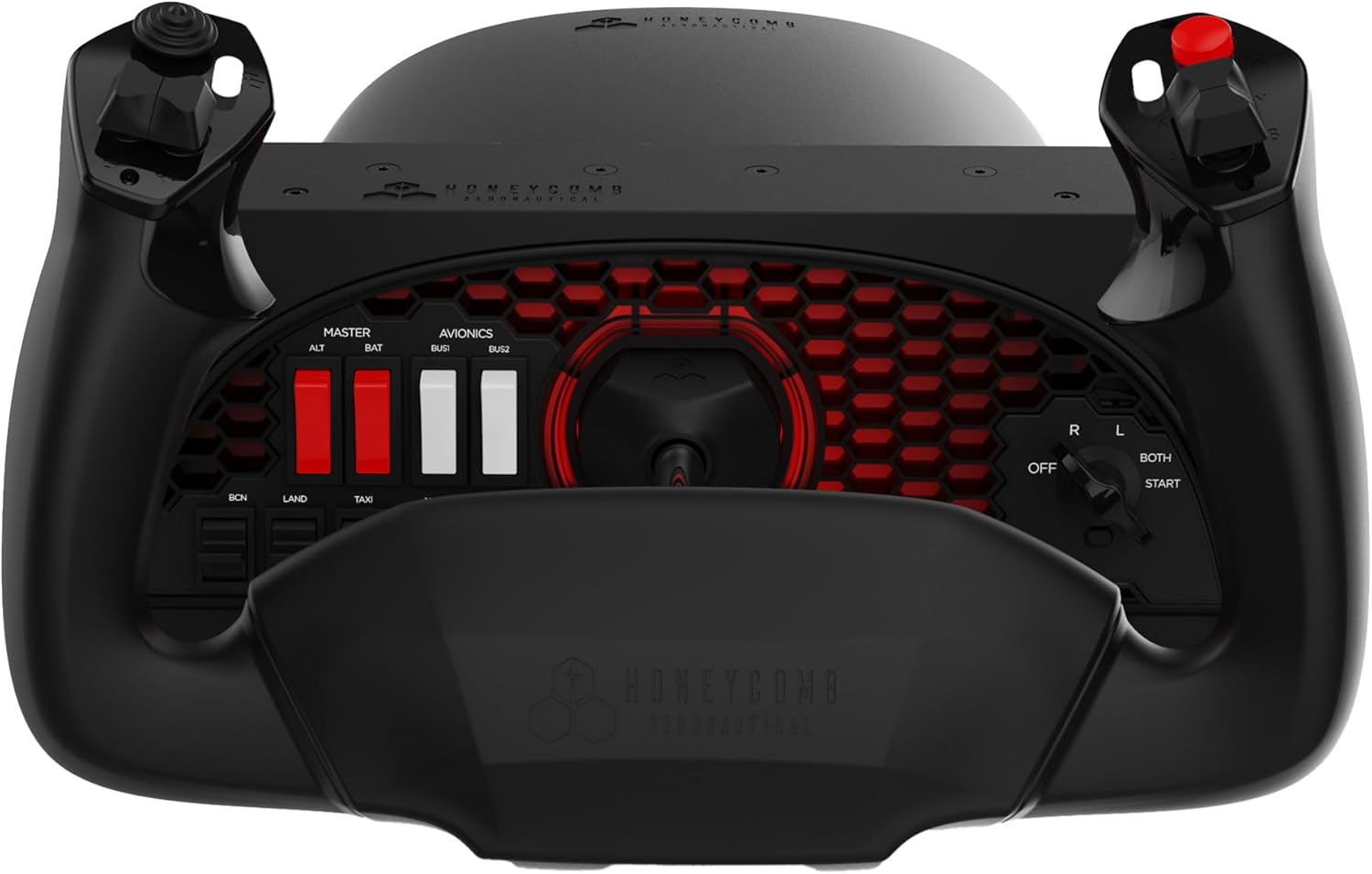
Honeycomb Alpha Flight Controls Lite
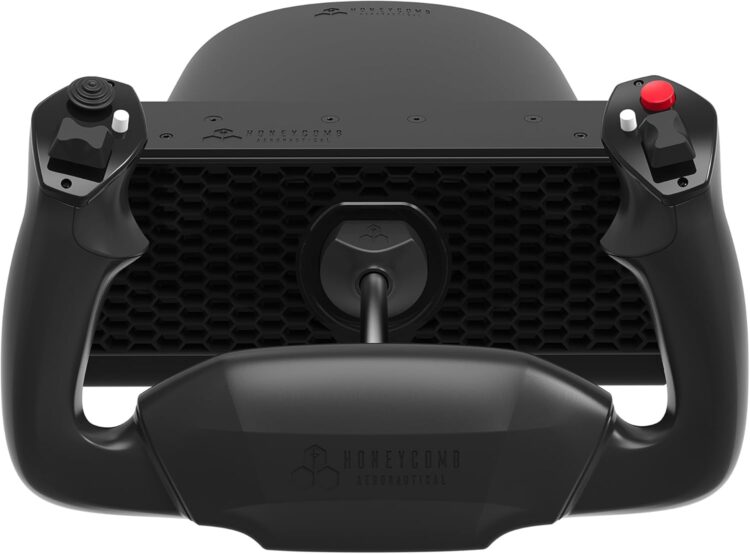
Honeycomb Aeronautical disrupted the simulator market by delivering aerospace-grade mechanical feel at accessible price points. The Alpha Lite is a focused, stripped-down iteration of its legendary flagship.
Overview: The Alpha Lite preserves the core mechanics of the original Alpha: a solid steel shaft, aerospace-grade internal ball bearings, and a full 180 degrees of authentic roll rotation. To reach the entry-level tier, Honeycomb removed the comprehensive electrical switch panel (magnetos, avionics, lighting controls) found on the base of the standard model, leaving a clean, minimal base unit.
Pros and Cons: The mechanical feel is unmatched at this price tier. The pitch axis uses a bungee cord tension system rather than a conventional metal spring, which elegantly eliminates the center detent that plagues the Logitech unit. Resistance is fluid, continuous, and predictable throughout the full range of motion—an enormous advantage for landing accuracy. The tradeoffs are equally clear: no throttle quadrant is included, requiring a separate purchase for power management. The absent switch panel means critical checklist functions—engine starts, strobe lights—revert to keyboard and mouse inputs.
Best Use Case: The purist student pilot on a strict budget who prioritizes authentic mechanical feel and precise sensor resolution in the primary flight controls over bundled accessories.
Entry-Level Yoke Comparison
| Feature / Specification | Logitech G Flight Yoke | Turtle Beach VelocityOne | Honeycomb Alpha Lite |
| Roll Rotation Angle | 90° (Compressed) | 180° (Authentic) | 180° (Authentic) |
| Internal Sensor Tech | Carbon Potentiometers | Contactless Hall-Effect | Proprietary / Smooth |
| Throttle Included | Yes (External 3-Lever) | Yes (Integrated Dual-Mode) | No (Standalone Yoke) |
| Platform Compatibility | PC Only | PC & Xbox Series X|S | PC Only |
| Primary Drawback | Heavy center pitch detent | Plastic shaft stiction | Lacks throttle & switches |
Mid-Range to High-End Yokes for Serious Aviators
When your simulation goals shift from casual recreation toward high-fidelity IFR procedure training, the hardware must scale accordingly. This tier abandons lightweight plastic in favor of aviation-grade aluminum, heavy steel bearings, and high-resolution data telemetry.
The Prosumer Workhorses
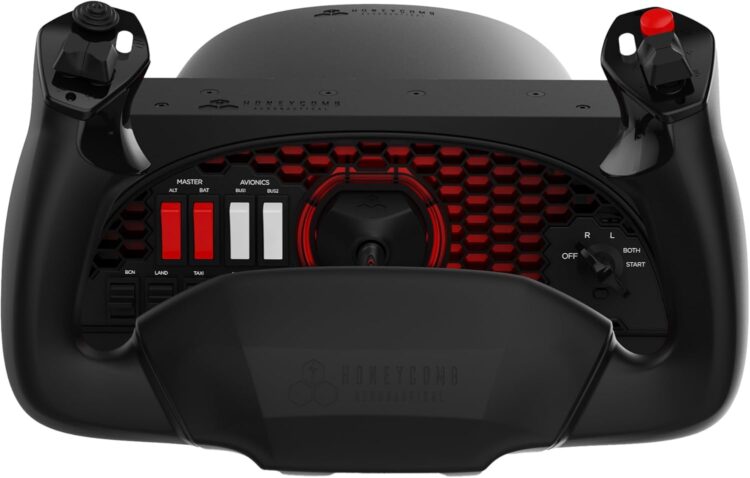
Honeycomb Alpha Flight Controls XPC builds directly on the original Alpha’s global success, widely regarded as the modernized gold standard for general aviation desktop simulation. The XPC upgrades the internal architecture to 12-bit Hall-effect magnetic sensors—a 400% increase in mathematical resolution over its predecessor—allowing the simulator to interpret microscopic physical inputs without any digital stepping. The reinforced base houses a comprehensive switch panel covering Master Battery, Alternator, Avionics, and exterior Lights, along with a 5-position ignition switch with a heavy spring-return mechanism engineered for realistic engine starts. Xbox users benefit from its central hub architecture, which allows independent Honeycomb rudder pedals and throttle quadrants to connect through a single console port. The result is absolute fluidity in both roll and pitch axes—zero binding, zero stiction—translating directly into superior crosswind handling and aircraft trimming. The main caveat is a documented history of supply chain inconsistency; the unit has occasionally been difficult to source through standard retail channels.
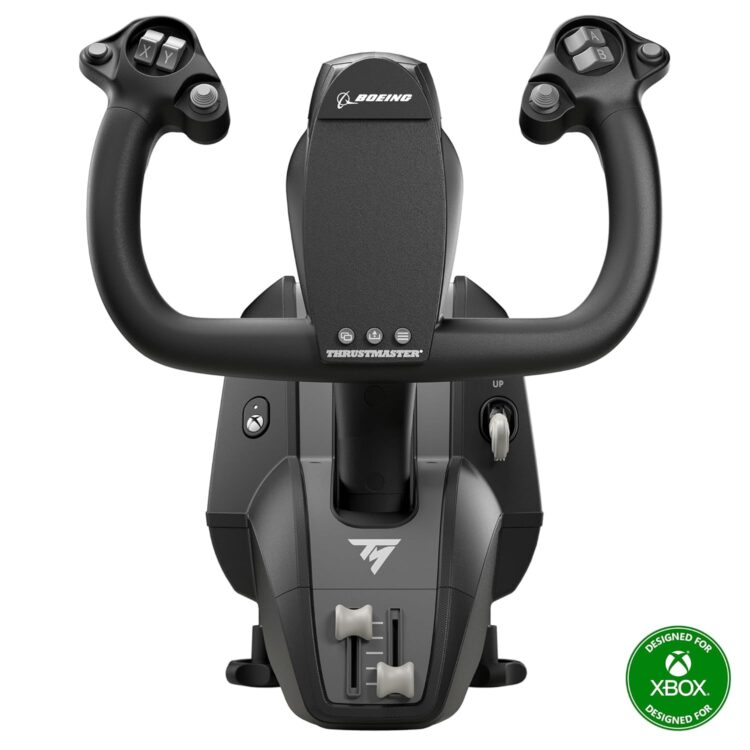
Thrustmaster TCA Yoke Boeing Edition is officially licensed by Boeing and engineered to replicate the specific kinematics of heavy commercial airliners. It discards the linear shaft entirely in favor of a pendular suspension system: the column pivots from an internal base mechanism, producing a sweeping 8.3-inch (21 cm) arc of pitch travel. The chassis is 100% metal, and adjustable dual-spring resistance generates the characteristic mass and inertia of large jets. Thrustmaster’s proprietary H.E.A.R.T (HallEffect AccuRate Technology) sensors offer a theoretically infinite operational lifespan. A critical hardware caveat, particularly on early production models, involves roll-axis twitching caused by electromagnetic interference between internal wire routing and the magnetic sensor board. Many users resolve this by physically disconnecting the internal throttle cables when using an external quadrant, but it remains a noted hardware risk worth researching before purchase.
Professional Training and Boutique Hardware
Virtual Fly Yoko Plus (YOKO+) represents the absolute pinnacle of static mechanical yokes. Manufactured in Europe, it features 144mm of linear pitch travel and an internal mechanism forged entirely from cast aluminum and steel. Industrial-grade elastic bungee systems replace conventional metal springs, delivering a heavy, linear, continuous resistance that is entirely free of center bumps or deadzones. Real-world pilots and flight instructors consistently note that the YOKO+ faithfully replicates the heavy, dampened aerodynamic control loading found in high-performance twin-engine aircraft and commercial turboprops. The trade-off is a significant financial investment and a large, heavy metal footprint on a standard desk.
Redbird Alloy YK1 is not a gaming peripheral—it is the exact commercial-grade yoke pulled from Redbird Flight Simulations’ FAA-approved Advanced Aviation Training Devices (AATDs), adapted for desktop use. Built entirely of thick metal and engineered to survive daily abuse by thousands of novice flight students, it is effectively indestructible. Its heavy, consistent pull force is specifically designed to build authentic muscle memory. The functional tradeoffs are real: the unit is loud—emitting a distinct metallic clanking during heavy deflections—and provides very few programmable buttons, since Redbird assumes the pilot is operating a separate, dedicated hardware avionics stack.
The Paradigm Shift: Dynamic Force Feedback
Every yoke described above—even the YOKO+—uses static resistance. Pull the yoke back, and it returns to center with the same tension regardless of whether you are parked on the ramp or screaming through turbulence at 250 knots. In a real aircraft, aerodynamic forces dictate yoke tension. Airspeed changes make the controls progressively heavier. Adjusting the trim tab physically shifts the neutral center point of the control column.
Force Feedback (FFB) yokes use motorized servos to physically recreate these dynamic loads, allowing you to feel airspeed changes, runway surface bumps, and—critically—the pre-stall airframe buffet that warns a real pilot of an imminent aerodynamic breakdown.
Brunner CLS-E NG, the Swiss-engineered pioneer of consumer FFB, uses proprietary CLS2Sim software to extract live telemetry from the simulator and translate it into servo torque. Real-world pilots praise its realism, though its pitch travel is somewhat shorter than a real Cessna (approximately 75mm), and per-aircraft software tuning is a meticulous, time-intensive process.
Moza AB9 FFB Base & AY210 Yoke represents the most disruptive recent entry in the FFB space. Moza applied its direct-drive sim-racing engineering expertise to aviation, producing a fanless servo motor capable of 12 Newton-meters of peak torque and 210 Newtons of push/pull force. Its Cockpit software interfaces directly with MSFS 2024 and X-Plane 12 telemetry, rendering everything from the asymmetrical drag of an engine failure to the precise trim relief of a commercial jet. The critical constraint: the unit’s raw servo power requires absolute, rigid mounting to a dedicated aluminum-extrusion cockpit chassis. The motor torque is capable of physically ripping the unit from a standard wooden desk during a simulated turbulence event.
High-End Yoke Comparison
| Model | Mechanism Style | Pitch Travel | Sensor Tech | Force Feedback |
| Honeycomb Alpha XPC | Linear Bungee | Moderate | 12-Bit Hall | No |
| Thrustmaster Boeing | Pendular Arc | 21 cm | Magnetic | No |
| Virtual Fly YOKO+ | Heavy Linear | 14.4 cm | 12-Bit Hall | No |
| Moza AB9 / AY210 | Servo Motor | 15 cm | Telemetry FFB | Yes (12 Nm) |
| Brunner CLS-E NG | Servo Motor | ~7.5 cm | Telemetry FFB | Yes |
The Core Process: How to Set Up and Calibrate Your Yoke
Buying the right hardware is only the first step. Mounting it correctly, registering it in your operating system, and calibrating it within your simulator is what actually determines whether premium hardware delivers premium performance.
Step 1: Mount It Rigidly and Manage Your Cables
Avoid glass desks and fragile particleboard surfaces—high-end yoke resistance generates real physical leverage against the mounting point. If using the included desk clamps, ensure they distribute weight evenly. For permanent installations, under-desk mounting plates (such as the AllSportSystems LowRiderPLUS) or dedicated aluminum-extrusion sim rigs like Playseat or Next Level Racing platforms are the correct solution.
Ergonomics matter, too. Mounting a yoke on top of a standard 30-inch desk places the control wheel at chest height—nothing like the lower-abdomen position it occupies in a real aircraft. Under-desk mounting correctly aligns your biometrics with real-world cockpit geometry and significantly reduces shoulder fatigue on long IFR sessions.
For power, connect your yoke exclusively to an externally powered USB hub plugged directly into a wall outlet. Passive splitters and front-panel PC case ports frequently deliver insufficient voltage, causing the yoke to drop offline mid-flight. Route all cables through split loom tubing to keep them clear of your feet and rudder pedal mechanisms.
Step 2: Establish a Clean Baseline in Windows (joy.cpl)
Before opening your simulator, register your yoke cleanly in the operating system:
- Press Windows Key + R to open the Run dialog.
- Type joy.cpl and press Enter.
- Select your yoke from the list and click Properties.
- Go to the Settings tab and run Calibrate.
- Move pitch and roll through their absolute mechanical extremes—full left, full right, full forward, full aft. This establishes clean digital boundaries in the registry so your simulator receives an uncorrupted 0-to-100% signal.
Step 3: Tune Sensitivity Inside Your Simulator
In Microsoft Flight Simulator 2024: Navigate to Options > Controls Options, select your yoke, then adjust two key settings. First, lower deadzones to 2%–5% on both the X (roll/aileron) and Y (pitch/elevator) axes—real aircraft control cables have no deadzone, and high-quality Hall-effect sensors do not require artificial buffering. Second, set the primary sensitivity slider to –30% and reduce reactivity to 40%. This introduces a non-linear response curve that simulates the aerodynamic mass of real control surfaces—your Cessna 172 will feel agile, your Boeing 747 will feel appropriately sluggish. MSFS 2024 supports per-aircraft curves; use them.
In X-Plane 12: Go to Settings > Joystick, physically move the yoke to identify the corresponding axis bars on screen, and assign roll to Roll and pitch to Pitch. Click Calibrate and sweep the controls to full mechanical deflection until all bars read clean green. Then adjust the Control Response sliders slightly right to create a non-linear curve that reduces hypersensitivity at the center, minimizing dangerous over-corrections during low-visibility instrument approaches.
Hidden Traps and Common Mistakes to Avoid
Trap 1: Windows USB Power Management
Three hours into a trans-oceanic flight, your yoke suddenly goes dark. The aircraft enters an uncontrolled dive. The hardware appears completely dead.
This is one of the most common hidden failures in home simulation. By default, Windows silently suspends USB devices to conserve power. To permanently disable this: open Device Manager, expand Universal Serial Bus controllers, right-click the USB Root Hub powering your yoke, select Properties > Power Management, and uncheck “Allow the computer to turn off this device to save power.”
Trap 2: Axis Cross-Contamination
Advancing the throttle causes the rudder to yaw hard left. The aileron axis twitches during stable cruise. This is axis cross-contamination, and it happens when simulators auto-assign redundant bindings across multiple connected peripherals—your yoke and your separate throttle quadrant both claiming the same input channels.
Navigate to the simulator’s control menu and use the Search by Input feature. Confirm that pitch and roll are mapped exclusively to the yoke device. Completely clear any default aileron/elevator bindings from your throttle quadrant. If you own the Thrustmaster TCA Boeing Yoke and are experiencing roll-axis twitching specifically, the hardware workaround is to physically open the casing and disconnect the internal auxiliary throttle cable, isolating the sensor board from electrical cross-talk.
Trap 3: Conflicting Third-Party Software (Your Plan B)
Installing legacy drivers—such as outdated Saitek SST profiler software from 2018—alongside a modern MSFS 2024 installation creates competing calibration protocols that can produce massive uncorrectable deadzones or a completely unresponsive pitch axis. Modern simulators have highly capable native plug-and-play decoding built in.
The Plan B: Uninstall all legacy third-party manufacturer profiling software and allow Windows’ native joy.cpl driver and the simulator’s internal calibration engine to handle raw axis data directly. For Force Feedback yokes (Moza or Brunner), temporarily disable any third-party traffic-injection mods that flood SimConnect with data packets if FFB motors begin behaving erratically or inducing frame-rate stutters.

Key Takeaways
- Prioritize sensor technology: Hall-effect magnetic sensors eliminate the drift and jitter that plague legacy carbon-track potentiometers, delivering precision that holds up over millions of actuation cycles.
- Match geometry to your aircraft: A 180-degree linear yoke accurately replicates general aviation handling; a pendular-arc mechanism is the correct choice for commercial airliner simulation.
- Check platform compatibility first: Xbox console simulation strictly requires hardware bearing certified “Made for Xbox” security chips—PC-only yokes will not function.
- Tune your simulator, not just your hardware: A –30% sensitivity curve and minimal 2%–5% deadzones simulate aerodynamic inertia and prevent violent over-corrections.
- Protect your USB connection: Use an externally powered USB hub and disable Windows USB power-saving protocols to prevent mid-flight disconnects.