


Your AirPods can’t plug into a seatback screen, but a pocket-size Bluetooth transmitter can bridge the gap. Run three free checks first, then pair it before takeoff.
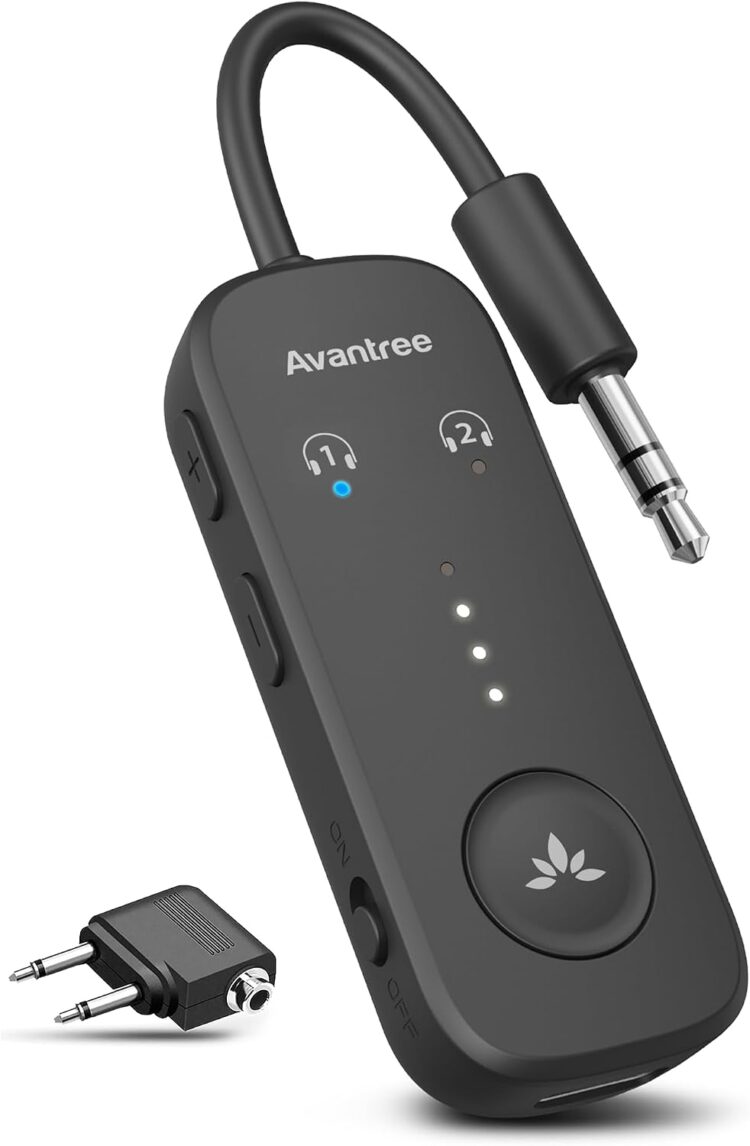
A Bluetooth adapter for airplane entertainment systems fixes one of flying’s most irritating mismatches: a seatback screen that wants a wire, and earbuds that don’t have one. The adapter is a small transmitter. It plugs into the seat’s headphone jack and sends the movie’s sound to your wireless headphones over Bluetooth. Avantree, for example, says its Relay airplane adapter is designed to send audio from 3.5mm sources to Bluetooth headphones.
Savvy fliers aren’t really ditching the jack, though. They’re plugging something smarter into it.
Before you buy anything, check three things. Some newer seats pair with Bluetooth headphones on their own, many over-ear noise-canceling headphones still accept a cable, and some flights have no seatback screen at all. Any one of those can make the gadget unnecessary.
Why does this matter now? Airlines are adding Bluetooth to seatback screens, but unevenly. In a May 1, 2026, announcement, United Airlines said more than 800 of its aircraft had seatback screens with Bluetooth audio. American, Delta, and JetBlue have also described Bluetooth in new or refreshed cabins, and some of those cabins aren’t flying yet. Whether you can pair directly depends on the exact aircraft and cabin, not the airline’s name. Here’s how to check, pair, buy, and troubleshoot.
The Short Answer
- Is there a Bluetooth or headphone-pairing option in the seatback menu? Follow the on-screen directions. You don’t need any extra gear.
- Do your headphones accept an audio cable? Bring the manufacturer’s cable and plug in.
- Do you have wireless-only earbuds, such as AirPods? Plug a compatible Bluetooth transmitter into the seat’s headphone output and pair your earbuds to it.
- Is there no seatback screen at all? If the airline streams entertainment to your own phone or tablet, your earbuds connect to that device as usual.
If you do need gear, the step-by-step section below walks you through it.
Before You Buy Anything: Three Quick Checks
These checks tell you whether you need to buy anything at all.
Check 1: Does Your Seat Already Have Bluetooth?
Some in-flight entertainment (IFE) systems let you pair headphones directly with the seatback screen. United’s 2023 instructions describe the routine: tap the Bluetooth icon on the screen, turn it on, disconnect your headphones from other devices, put them in pairing mode, and select them on the screen. Menus change over time, so follow what your screen actually shows.
Here’s what the other big U.S. carriers say:
- American Airlines: The airline’s centennial page lists Bluetooth on its premium-configured Boeing 787-9 and Airbus A321XLR. When American launched that premium 787-9 in June 2025, it described Bluetooth in every cabin of that configuration. That isn’t a promise that every 787-9 has it.
- Delta Air Lines: The Delta Sync page describes personalized seatback features and lists the aircraft that have them. It doesn’t mention Bluetooth audio, so don’t treat Delta Sync branding as a sign you can pair.
- JetBlue: The airline’s Main cabin page tells passengers to plug in wired earphones to use the seatback TV.
The practical test is the seat in front of you. Look for a pairing option in the entertainment menu, and treat the aircraft type as a clue rather than a guarantee. Aircraft swaps happen, so we’d pack a backup either way.
Check 2: Can Your Headphones Take a Cable?
A cable is often the simplest fix, but it depends on the exact model:
- Bose QuietComfort Headphones: Bose’s in-the-box list includes a 3.5mm-to-2.5mm audio cable (the spec table on the same page says otherwise, so check your box). Bose says wired playback keeps working when the battery is dead, but noise cancellation and Active EQ don’t.
- Sony WH-1000XM6 works with its supplied headphone cable even when the headset is switched off, though noise canceling needs power. Sony says to insert the cable until it clicks, and Bluetooth turns off while the cable is connected.
- AirPods Max need a separate Apple cable. Apple specifies the Lightning to 3.5mm Audio Cable for the original Lightning model, and the USB-C to 3.5mm Audio Cable for the USB-C model and AirPods Max 2.
- AirPods and AirPods Pro have no wired input, so a cable won’t help.
Use the cable your headphone maker specifies; a charging cable or generic dongle isn’t necessarily equivalent.
Check 3: Is There a Screen at All?
Southwest’s help center says the airline has no seatback screens or devices for rent, and its inflight entertainment page tells passengers to bring their own device and headphones and says streaming requires no downloads or sign-ups. On some flights, though, licensing limits mean you’ll need content downloaded to your device beforehand. The route it describes: turn on airplane mode, turn Wi-Fi on, choose the Southwest WiFi network, then tap Access the portal or type SouthwestWiFi.com in your browser. Your Bluetooth earbuds connect to your phone as usual. Confirm the portal works on your flight; not every airline without screens offers one.
How a Bluetooth Adapter for Airplanes Works
The Gadget in Plain English
A Bluetooth transmitter is a small battery-powered bridge between a wired jack and your wireless headphones. It doesn’t change the airplane’s entertainment system or supply the movie. It just carries the sound.
The direction matters. In transmit mode, the device sends audio from a wired source to wireless headphones. That’s the job you need on a plane. In receive mode, it does the opposite: it picks up Bluetooth audio from your phone and feeds it into something with an AUX input, such as a car stereo. Some adapters do both. Twelve South says its AirFly Pro 2 switches between the two with a TX/RX toggle button on the side. Others do only one. Avantree says the Relay only transmits and can’t receive audio from a phone.
Some aircraft have a two-socket audio outlet rather than a single 3.5mm hole. For those, you need a dual-prong airline adapter. The Relay includes one. The AirFly Pro 2 includes one only in its Deluxe bundle. Both models can also send audio to two sets of headphones at once, which is handy for couples and parents.
Jargon Decoder
- 3.5mm jack: The standard round headphone socket. It’s the plug size the transmitters in this guide use.
- Dual-prong (two-prong) airline adapter: A small plug that connects a 3.5mm transmitter to an aircraft’s two-socket audio outlet. It changes the shape of the connection. It doesn’t add Bluetooth.
- TX / RX: Transmit and receive. On a plane, you want TX.
- Latency: The lip-sync lag between the picture and the sound. Low-latency audio only works when both the transmitter and the headphones support the same low-latency technology.
- Codec: The format used to encode Bluetooth audio. The Bluetooth Special Interest Group’s audio profile documentation lists SBC (Sub-Band Codec) and AAC. AAC stands for Advanced Audio Coding. aptX is a separate branded family of codecs.
- Pairing mode: The state in which headphones can be found and registered by a new device. Turning headphones on doesn’t always put them in pairing mode.
Is It Allowed on the Plane?
The FAA’s Fly Safe guidance, last updated in November 2025, says phones and other portable electronic devices (PEDs) must be in airplane mode or have cellular service turned off. It also tells travelers to follow the flight crew and listen to the safety briefing. Your airline and its crew decide what you can use and when, whatever your gadget’s box says.
The FAA’s PackSafe guidance on devices with batteries, last updated in September 2025, says to keep lithium-battery devices in your carry-on when you can. Spare lithium batteries must stay in carry-on bags, and you should take them out if your bag is gate-checked. Tell the crew right away if a device overheats, swells, smokes, or burns. Confirm your airline’s current rules before you fly.
Your Preflight Kit: What to Pack
Keep everything together in one small pouch:
- Your Bluetooth transmitter, fully charged. It’s the whole point.
- The transmitter’s own charging cable. For example, Twelve South includes a USB-A to USB-C cable with the AirFly Pro 2.
- A dual-prong airline adapter, if your transmitter doesn’t come with one. The standard AirFly Pro 2 box doesn’t list one. The Deluxe bundle adds the adapter and a travel bag.
- Your wireless headphones or earbuds, charged, plus any case your model needs. AirPods pair through their case.
- A wired backup. That means your headphones’ specified audio cable or a pair of 3.5mm wired earbuds.
- Optional: a power bank. The FAA’s lithium battery guidance (last updated in August 2026) says power banks go in carry-on bags, need protection against short circuits, and must come out of a bag that’s gate-checked. Airlines can set stricter limits. Delta’s battery rules, for example, allow no more than two power banks per person, each no larger than 100 Wh. Delta also bans them from overhead bins, prohibits recharging them on board, and prohibits using one to charge a device during taxi, takeoff, and landing.
Do the first pairing at home, not at the gate.
Step-by-Step: How to Connect Wireless Headphones to a Seatback Screen
You’re done when you hear the movie in both ears, not when a light comes on.
At Home (Steps 1–4)
- Choose a transmitter that fits your jack and your headphones. Make sure it has transmit mode, the right plug or adapter, enough listener slots, and a low-latency codec your headphones also support. See our picks below.
- Charge everything before your trip. Charge both the transmitter and the headphones, and check each one’s battery indicator. Twelve South rates the AirFly Pro 2 at 25+ hours and says it fully charges within two hours. Those are manufacturer ratings, so don’t count on a half-charged device lasting a long flight.
- Do a test pairing at home. Plug the transmitter into a device with a working headphone output (not an audio input), and confirm you hear sound. To put your headphones in pairing mode:
-
- AirPods (1st–3rd generation) and AirPods Pro (1st–2nd generation): According to Apple’s instructions for non-Apple devices, put the earbuds in the case, open the lid, and hold the setup button on the back for about five seconds, until the light flashes white.
- AirPods 4, AirPods 5, and AirPods Pro 3: Open the case with the earbuds inside and double-tap the front of the case until the light flashes white.
- Sony WH-1000XM6: Sony’s pairing guide says to hold the Bluetooth button for about five seconds or longer, until the blue light repeatedly flashes twice.
- Bose QuietComfort Headphones: Slide and hold the switch toward the Bluetooth icon until the blue light flashes or you hear the pairing prompt.
For the Relay, the setup guide says to switch it on and, if it isn’t already searching, hold the multifunction button (MFB) until the light alternates red and blue. Keep both devices close. Solid blue means connected. Play something and check both ears.
- Stop your phone from hijacking the connection. Apple’s automatic switching moves AirPods between Apple devices signed in to the same Apple Account. To limit it, connect and wear your AirPods, then on your iPhone or iPad go to Settings > Bluetooth. Tap the More Info button next to your AirPods, tap Connect to This iPhone (or iPad), and choose When Last Connected to This Device. While pairing to the Relay, Avantree recommends temporarily turning off Bluetooth on nearby devices the headphones have paired with before. Neither step guarantees an uninterrupted connection.
On Board (Steps 5–9)
- Switch your phone to airplane mode. Follow the rules in “Is It Allowed on the Plane?” above. The transmitter doesn’t need your phone’s Bluetooth, because the sound travels from the seat to the transmitter to your headphones.
- Plug in the transmitter. Use the seat’s headphone output, which may be in the armrest or near the screen. Don’t use the USB charging port. Avantree’s one-side sound guide says to push the Relay, the dual adapter, and both aircraft plugs all the way in when you use the adapter. Don’t force a plug that doesn’t fit.
- Pair the headphones to the transmitter. Twelve South’s AirFly Pro 2 pairing instructions say it goes into pairing mode the first time it’s switched on. After that, hold PAIR 1 for four seconds. A flashing amber and white light means it’s searching. The headphones must be in pairing mode and disconnected from other devices. For the Relay, use the MFB and wait for solid blue. For the AirFly SE, Twelve South’s 2024 owner’s guide says the unit goes into pairing mode the first time it’s switched on, and that holding the reset button for four seconds puts it back in pairing mode. Lights and buttons differ by model, so check the current guide for yours.
- Start the movie, then set the volume in order. Avantree’s guide separates three volume controls. Start the movie, then raise the volume slowly on the seatback screen, then the transmitter (if it has a control), then the headphones. If the light says paired but you hear nothing, check the source and the jack.
- Add a second listener, if your model supports it. On the AirFly Pro 2, according to Twelve South’s shared-listening instructions, switch the unit on, put the second headphones in pairing mode, and hold PAIR 2 for four seconds. The PAIR 2 light stays on for 10 seconds after it connects. On the Relay, Avantree says to leave the first pair connected, put the second pair in pairing mode, and hold the MFB for about two seconds. Avantree’s dual-link guide says two over-ear headphones or two similar earbud models may work more reliably, and suggests testing each pair on its own if audio is unstable. Both listeners hear the same screen, not two different movies.
Pro Tip: Pause your audio for crew announcements. Before you stand up to deplane, add the transmitter and its plug adapter to your seat check, along with your headphones and their case.
The Best Bluetooth Adapters for Airplane Travel
What to Look For
Check each item against the manufacturer’s page for the exact model:
- Transmit mode. It must transmit, or have a TX setting if it’s a dual-mode unit.
- Plug fit. You need a 3.5mm plug, plus a dual-prong adapter if the aircraft needs one. Check whether it’s in the box or only in a bundle.
- Battery rating and charging cable. Ratings are the manufacturer’s, not a guarantee.
- Number of listeners. Some models send to one pair of headphones, others to two.
- A codec both ends share. A low-latency codec helps only if your headphones support it too. A higher Bluetooth version number alone doesn’t mean low latency.
- Receive mode (optional). A bonus if you also want to use it with a car stereo or gym equipment.
Our Picks
Our “best for” labels match each model to a use, based on manufacturers’ published specs.
Twelve South AirFly Pro 2 — Best for Sharing and Double Duty
Key specs: A transmitter that doubles as a receiver. Twelve South lists two simultaneous headphones, a 25+ hour battery rating, USB-C charging, volume and mute controls, and transmit and receive modes. Its codec support page lists aptX Adaptive, aptX Low Latency, aptX HD, aptX, and SBC in transmit mode. AAC appears only in receive mode.
Why it fits: Sharing a movie with a companion, plus car use.
Pros:
- Separate PAIR 1 and PAIR 2 buttons for two listeners
- Works as a receiver too
Cons:
- Airline adapter only in the Deluxe bundle
- Its low-latency codecs don’t apply to AirPods
Note: One Twelve South compatibility page says the Pro 2 transmits to one pair of headphones, while the product page and the dedicated shared-listening instructions say two. As of Oct. 9, 2026, Twelve South hadn’t reconciled the two statements on its product or support pages.
Price tier: Premium. Check the current price.
Twelve South AirFly SE — Best for Solo Fliers Who Want It Simple
Key specs: Twelve South’s entry-level model. The current AirFly SE product page lists one pair of headphones, up to 20 hours of battery life, and a USB-C to USB-A charging cable. It doesn’t list an airline plug adapter in the box. A March 2025 Twelve South comparison said the SE supports only the SBC codec. Confirm current codec details with Twelve South before buying.
Why it fits: Solo travelers who want one device for one job.
Pros:
- Simple single-listener design
Cons:
- No second listener
- No airline adapter listed in the box
Price tier: Entry level. Check the current price.
Avantree Relay — Best for Headphones With aptX Low Latency
Key specs: A transmitter-only adapter. Avantree lists two listeners, up to 25 hours of battery life, volume controls, an included dual-prong airline adapter, and support for aptX, aptX Adaptive, aptX HD, aptX Low Latency, and SBC. It weighs about half an ounce (15 grams). Avantree puts latency at about 40 milliseconds with aptX Low Latency and about 220 milliseconds with SBC. Those are manufacturer figures, not measurements of your aircraft and headphones.
Why it fits: Headphones with a matching low-latency aptX codec, and travelers who share.
Pros:
- Airline adapter in the box
- Supports two listeners
Cons:
- Transmit-only, so it can’t double as a car-stereo receiver
- Its low-latency codecs don’t apply to AirPods
Price tier: Value-oriented compared with premium multifunction models. Check the current price.
Side-by-Side Comparison
| Model | Best for | Listeners | Battery rating | Two-prong adapter included | Low-latency transmit codec | Price tier |
| AirFly Pro 2 | Sharing, plus receive mode | 2 | 25+ hours | Deluxe bundle only | aptX Low Latency / aptX Adaptive | Premium |
| AirFly SE | One listener | 1 | Up to 20 hours | Not listed | Check current specs | Entry |
| Avantree Relay | Headphones with matching aptX | 2 | Up to 25 hours | Yes | aptX Low Latency / aptX Adaptive | Value-oriented |
Before You Check Out: Two Compatibility Cautions
- A brand name doesn’t guarantee your headphones will work. UGREEN’s Canadian and Australian pages for its transmitter, SKU 45812, both warn that AirPods Pro 2 and AirPods 4 aren’t supported. The two listings also give different Bluetooth versions. Skip it for those AirPods, and check the exact U.S. version otherwise.
- Read the return terms on clearance items. Twelve South’s listing for the older AirFly Pro Deluxe labels the clearance item final sale, with no returns or warranty replacement. Other text on the same page advertises returns and a warranty. Get the terms in writing before you pay.
What It Costs — and Whether It Pays Off
Check the current price for the exact model and bundle. Whether it’s worth it depends on the three checks: if your seat pairs directly or your headphones came with a cable, you may not need to spend anything. The time it takes is mostly at home: charging, a test pairing, and a sound check. Order early enough that you can finish that test before you leave.
Hidden Traps and Rookie Mistakes
These are listed by how badly they can spoil a flight, not by how often they happen.
Mistake: Buying a receiver instead of a transmitter Fix: Confirm that the product’s documentation lists transmit or TX mode. Set a dual-mode unit to TX before you board.
Mistake: Arriving with a dead transmitter Fix: Charge it before you leave and check its battery indicator. Pack the charging cable made for that model, and follow your airline’s rules for charging on board.
Mistake: Forgetting the two-prong adapter Fix: Keep a matching adapter in your gadget pouch for two-socket outlets, and never force a plug into a socket it wasn’t made for.
Mistake: Letting your phone steal the connection Fix: Temporarily disconnect competing devices while you pair, and use the settings in Step 4. Airplane mode doesn’t necessarily turn off Bluetooth. Some headphones, including Bose QuietComfort Headphones, can stay connected to two devices and switch sound between them.
Mistake: Expecting perfect lip-sync Fix: Compare both codec lists before you buy. Avantree’s explanation of audio lag says low latency requires compatible technology at both ends, and that AirPods don’t support aptX Low Latency or aptX Adaptive. If the delay is distracting, use a wired connection or watch on your own device.
Mistake: Leaving the adapter in the seat jack Fix: Add the transmitter to your seat check before you deplane. Put the small plug adapter back in the pouch with the transmitter as soon as you unplug.
Mistake: Turning the volume all the way up to make up for weak seatback sound Fix: Raise the volume gradually, as in Step 8. If it’s still too quiet or distorted, switch to a backup option. The National Institute on Deafness and Other Communication Disorders’ guidance on noise-induced hearing loss, last updated in April 2025, says loud sound can damage hearing, whether it’s very loud for a short time or loud and long-lasting. It lists listening to headphones at high volume among the risks.
When It Won’t Connect: Troubleshooting and Plan B
Quick-Fix Table
A symptom isn’t a diagnosis, so start with the simplest checks. Use only the reset steps for your exact device. A Relay reset won’t work on an AirFly.
| Symptom | Try this |
| Connected, but no sound | Start the movie’s audio. Push the plug in fully. Check the volume on the screen, then on the transmitter, then on the headphones. |
| Sound in one ear only | Reseat the transmitter and every adapter connection. Stop your phone from reconnecting. Restart or reconnect, then check both ears. |
| Crackling or static | Check that the plug is fully inserted. If it persists, try your headphones’ audio cable. |
| Audio behind the picture | Check that the transmitter and headphones share a codec. Re-pair close to the transmitter, or switch to wired audio. |
| Headphones won’t pair | Disconnect other devices. Make sure both the transmitter and the headphones are in pairing mode. If that fails, reset using the steps for your exact model. |
| Connection drops | Check the transmitter’s battery indicator, and check for a phone or tablet reconnecting. A dropout alone doesn’t tell you the cause. |
For the Relay, Avantree’s reset instructions say to switch the unit on and hold + and − together for six seconds. That clears saved connections; the light then alternates red and blue in pairing mode, and solid blue means success.
Plan B: Backup Options to Try
None works on every flight; each depends on the ports, equipment, charge, and connectivity:
- Plug in your headphones’ specified audio cable, or 3.5mm wired earbuds. This is the most direct route if your seat’s jack works.
- Ask the crew whether headsets are offered. It varies by airline. Southwest’s entertainment page, for instance, tells passengers to bring their own device and headphones.
- Watch on your own device. If your airline streams entertainment to personal devices, confirm before you fly that its portal is available on your flight. Don’t assume a cabin without screens comes with streaming.
- Download before you go. Where your streaming service allows offline viewing, download a few titles and test that they play before you leave home.
FAQ
Q: How do I connect my AirPods to the seatback screen on a plane step by step?
A: To connect AirPods to a seatback screen, use the seat’s own Bluetooth pairing option if it has one, or pair your AirPods to a compatible transmitter plugged into the seat’s headphone output.
- Check the seatback menu for a pairing option, and follow crew instructions on device use.
- If there’s no pairing option, plug in your transmitter.
- Put your AirPods in pairing mode using the control for your generation (Step 3 above).
- Put the transmitter in pairing mode using its own control (Step 7).
- Start the movie and raise the volume in order: screen, transmitter, AirPods (Step 8).
Q: What is the best Bluetooth adapter for airplane entertainment systems if I fly with AirPods Pro?
A: The best Bluetooth adapter for AirPods Pro is one documented to work with your AirPods generation and easy for you to pair. An aptX logo doesn’t tell you that.
- Start with the three models above and read their limitations.
- Check transmit-mode codecs separately from receive-mode codecs. The AirFly Pro 2, for example, lists AAC only in receive mode.
- AirPods don’t support aptX Low Latency or aptX Adaptive, so those features won’t reduce lag with AirPods Pro.
- Check your exact AirPods generation against the exact retail version. UGREEN’s SKU 45812, for instance, excludes AirPods Pro 2.
Q: Are Bluetooth transmitters allowed on U.S. flights, and do I have to turn them off for takeoff?
A: Using a Bluetooth transmitter on a U.S. flight depends on your airline’s policy and what the crew tells you during each phase of the flight.
- Turn on airplane mode or turn off cellular service, as the FAA’s guidance requires.
- Follow crew instructions, including any request to stop listening or put devices away.
- Check your airline’s battery and charging rules before you fly.
Q: Which U.S. airlines let me pair Bluetooth headphones directly to the seatback screen without an adapter?
A: Direct seatback Bluetooth pairing depends on the specific aircraft and cabin, not just the airline.
- United said on May 1, 2026, that more than 800 of its aircraft had Bluetooth-enabled seatback screens.
- American lists Bluetooth on its premium-configured Boeing 787-9 and Airbus A321XLR. It has also announced plans for seatback screens with Bluetooth at every seat on narrowbody jets, starting with new deliveries in 2028 plus retrofits, and expects to finish early next decade.
- Delta’s April 2026 Suite Spot announcement describes Bluetooth at every seat on its new Airbus A350-1000 and refreshed A330-200/-300 aircraft. Delta says the A350-1000 arrives in early 2027 and hasn’t dated the A330 refresh, so treat this as a future product, not a guarantee for today’s flight.
- JetBlue’s Sept. 1, 2026, BlueFirst announcement says the new first-class seats will have Bluetooth, with the first aircraft due to debut later in 2026.
- Either way, check the seat’s menu and pack a backup.
Q: Why is there a delay between the picture and the sound when I use a Bluetooth adapter on a plane, and how do I fix it?
A: Bluetooth audio delay on a plane depends on whether your transmitter and headphones share a low-latency codec. Avantree says lag comes from standard Bluetooth audio when there’s no compatible low-latency connection.
- Compare the codec lists for your transmitter and your headphones.
- Reconnect with the devices close together.
- Switch to a wired connection if the delay is still distracting.
Q: Can two people watch the same seatback movie with their own wireless headphones using one adapter?
A: Two people can share one seatback movie if they use a dual-link transmitter, which sends one screen’s audio to two sets of headphones.
- Follow your model’s second-listener steps (Step 9).
- Where the instructions say to, keep the first pair connected while you add the second.
- If sharing fails, follow your model’s dual-link guide and test each pair on its own.

Key Takeaways
- Check the seatback menu for Bluetooth pairing, and check whether your headphones take a cable, before you buy anything.
- If you need an adapter, pick one with transmit mode that fits the seat’s audio jack, your headphones, and the number of people listening.
- Charge everything and do a test pairing at home, and keep your phone from grabbing the connection.
- Pack the matching two-prong adapter and a wired backup.
- Follow crew instructions, and take the adapter with you before you deplane.